[Development]
OAuth 2.0 and OIDC — From Authentication vs. Authorization to How Social Login Really Works
"We implemented login with OAuth" — you hear this a lot. But OAuth was never meant to be a login (authentication) protocol.
Confusing OAuth and OIDC is incredibly common. Once you clearly understand the difference and trace how social login actually works internally, JWT follows naturally.
Authentication vs. Authorization#
This is the first concept to get right.
| Concept | Term | Question | Example |
|---|---|---|---|
| Authorization | Authorization | What can you do? | File access permissions |
| Authentication | Authentication | Who are you? | Login |
OAuth 2.0 is an authorization protocol. It handles "this app is allowed to access my Google Calendar."
OIDC is a protocol that adds an authentication layer on top of OAuth 2.0. It handles "this person is verified to be the owner of this Google account."
OAuth 2.0 — Delegated Authorization#
The core insight of OAuth 2.0 is that users never have to give their password directly to a third-party app.
Imagine you're building an app that reads a user's Google Calendar events. In the old days, the app would collect the user's Google username and password and use them directly. OAuth changes that.
- User clicks "Connect with Google" in the app
- Redirected to Google's login screen
- User logs in directly to Google and grants permissions
- Google issues an Access Token to the app
- The app uses this token to call the Calendar API
The app never sees the Google password, and it can only access the scopes the user explicitly permitted.
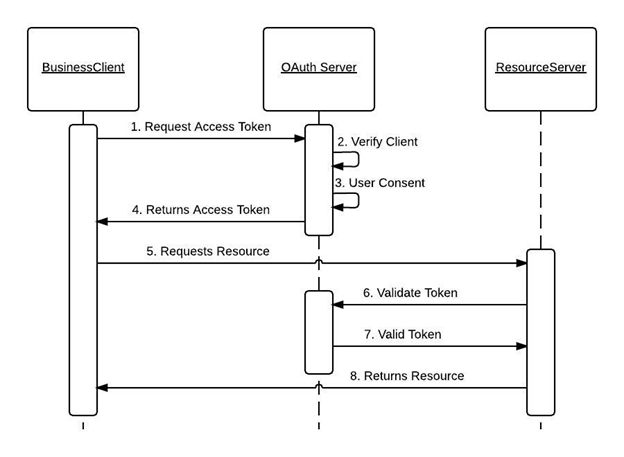
Authorization Code Flow#
This is the most commonly used OAuth flow.
User → App: Login request
App → Authorization Server: Redirect (client_id, scope, redirect_uri, state)
User → Authorization Server: Login + consent
Authorization Server → App: Authorization Code (via redirect_uri)
App → Authorization Server: Authorization Code + client_secret → token request
Authorization Server → App: Access Token + Refresh Token issued
App → Resource Server: API call using Access Token
The reason for the intermediate Authorization Code step is to prevent the Access Token from ever appearing in the browser's URL bar.
The state value passed along is a CSRF protection mechanism. The app generates a random value at request time, the authorization server returns it unchanged, and the app verifies it matches to filter out forged callbacks.
Below is an Authorization Code Flow diagram provided by Oracle.
Access Token and Refresh Token#
| Token | Role | Lifespan |
|---|---|---|
| Access Token | Used for API calls | Short (typically 1 hour) |
| Refresh Token | Used to reissue Access Tokens | Long (days to months) |
When an Access Token expires, a Refresh Token is used to obtain a new one. When the Refresh Token also expires, the user needs to log in again.
OIDC — Adding an Authentication Layer on Top of OAuth#
With OAuth 2.0 alone, there's no way to know "who owns this token." OIDC solves this problem with an ID Token.
OIDC extends the OAuth 2.0 flow by additionally issuing an ID Token. The ID Token is in JWT (JSON Web Token) format.
Authorization Code Flow + ID Token issuance
JWT — The Structure of an ID Token#
An ID Token (JWT) consists of three parts separated by dots (.).
header.payload.signature
The payload section contains user information (claims).
{
  "sub": "1234567890",
  "name": "Jaejun",
  "email": "jaejun@example.com",
  "iss": "https://accounts.google.com",
  "aud": "my-app-client-id",
  "exp": 1714000000,
  "iat": 1713996400
}
| Claim | Meaning |
|---|---|
sub | User's unique ID |
iss | Token issuer |
aud | Intended audience (your app) |
exp | Expiration time |
Here's the most common misconception about JWT: it uses encoding, not encryption. The payload is simply base64url-encoded, which means anyone can paste it into a tool like jwt.io and read the contents immediately.
The third segment — the signature — is not about hiding content; it's about preventing tampering. The server verifies the signature to confirm the token hasn't been modified since it was issued.
In practice: Never put sensitive data like passwords or government IDs in a JWT.
Since it's encoding and not encryption, anyone who intercepts the token can read its contents immediately.
PKCE — Defending Against Authorization Code Interception#
The standard Authorization Code Flow assumes the client_secret can be safely stored on a server.
But SPAs (like React apps) and mobile apps have no way to hide a client_secret. This is where PKCE (Proof Key for Code Exchange) comes in.
App: Generate code_verifier (random string)
App: Hash code_verifier with SHA-256 to produce code_challenge (method=S256)
App → Authorization Server: Send authorization request with code_challenge
Authorization Server → App: Issue Authorization Code
App → Authorization Server: Token request with Authorization Code + code_verifier
Authorization Server: Hash code_verifier and compare with code_challenge → issue token if match
This prevents Authorization Code interception attacks without needing a client_secret.
In practice: PKCE is no longer just for SPAs and mobile apps.
The latest OAuth 2.1 guidance recommends PKCE for all clients, including server-side apps that can securely store aclient_secret.
OAuth vs. OIDC — When to Use Which#
| Purpose | Protocol |
|---|---|
| Delegating access to an external service's API | OAuth 2.0 |
| Social login (verifying user identity) | OIDC |
| Both | OIDC (built on top of OAuth) |
Any service with a "Sign in with Google" button is using OIDC.
In Practice — Social Login in Next.js#
In Next.js, Auth.js (formerly NextAuth.js) lets you implement OAuth/OIDC flows without building them from scratch. The configuration below is based on the current standard, Auth.js v5.
// auth.ts
import NextAuth from 'next-auth'
import Google from 'next-auth/providers/google'

export const { handlers, auth, signIn, signOut } = NextAuth({
  providers: [Google],
})
// app/api/auth/[...nextauth]/route.ts
import { handlers } from '@/auth'

export const { GET, POST } = handlers
clientId and clientSecret are automatically read from the AUTH_GOOGLE_ID and AUTH_GOOGLE_SECRET environment variables, and the library handles Authorization Code Flow + PKCE internally.
Summary#
| Concept | Description |
|---|---|
| OAuth 2.0 | Authorization protocol — delegates permissions |
| OIDC | Authentication protocol — adds ID Token on top of OAuth 2.0 |
| Authorization Code Flow | The most secure OAuth flow — ideal for server-side apps |
| Access Token | Used for API calls; short-lived |
| Refresh Token | Used to reissue Access Tokens; long-lived |
| ID Token (JWT) | Token carrying user identity (encoded, not encrypted) |
| PKCE | Defends against Authorization Code interception — recommended for all clients |
| Auth.js (NextAuth) | Library that abstracts OAuth/OIDC implementation in Next.js |