[Claude Code in Action]
Claude Code in Action - What is Claude Code?
This post is a translated and summarized version of the Anthropic official course (by Steven Greider, Anthropic tech staff).
This is the first section of Claude Code in Action.
What's Really Happening Behind a Coding Assistant#
When we use a coding assistant, we just type a question into a chat window. But if you understand what's actually going on behind the scenes, it becomes clear why some assistants are exceptional while others are just okay.
The workflow of a coding assistant can be broken down into three stages:
1. Context Gathering: Figure out what code an error message is pointing to, and identify the relevant files.
2. Planning: Devise a strategy for solving the problem — decide whether to modify code and run tests, or take a different approach.
3. Execution: Actually modify files and run commands.
Here's the key insight: stages 1 and 3 aren't just about generating text — they require interacting with the outside world. Reading files, fetching documentation, running commands — that kind of thing.
Language Models Only Deal in Text#
This is where the fundamental challenge lies.
A language model takes text as input and returns text as output. That's all it does. Whether it's Claude, GPT, or Gemini, every language model operates on this principle without exception.
So if you ask a language model directly — without a coding assistant layer — "What's in my main.go file?", the model will simply reply: "I can't read files."
Tool Use — How Language Models Gain New Abilities#
So how does a coding assistant actually read files?
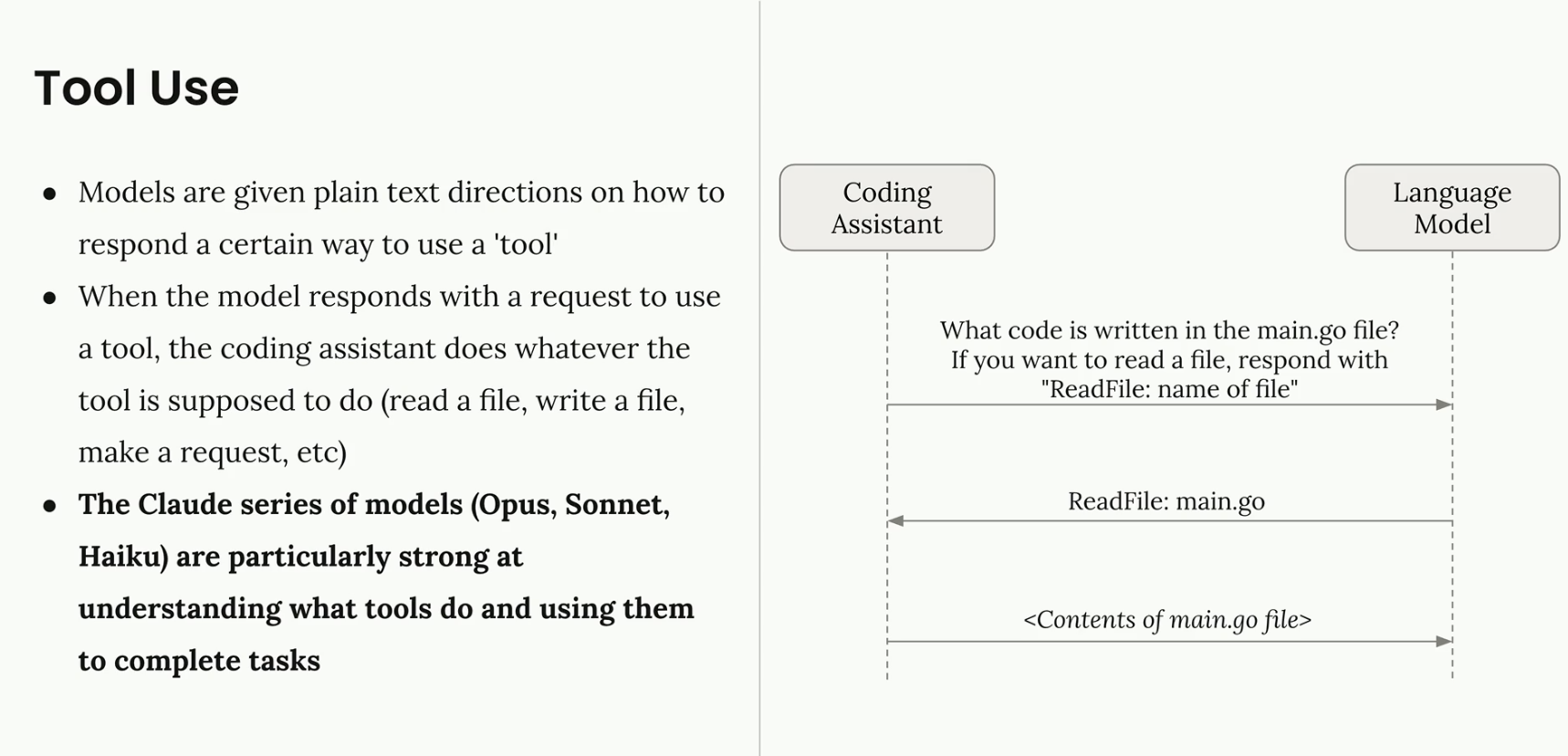
The trick is simple. Instead of passing your request directly to the language model, the assistant automatically appends something like this behind the scenes:
"If you want to read a file, respond in this format:
read_file: filename"
Once the language model understands this convention, it responds with read_file: main.go. The assistant detects this response, actually reads the file, and passes the contents back to the model. The model then uses the file contents to generate a final answer for the user.
This entire mechanism is called Tool Use.
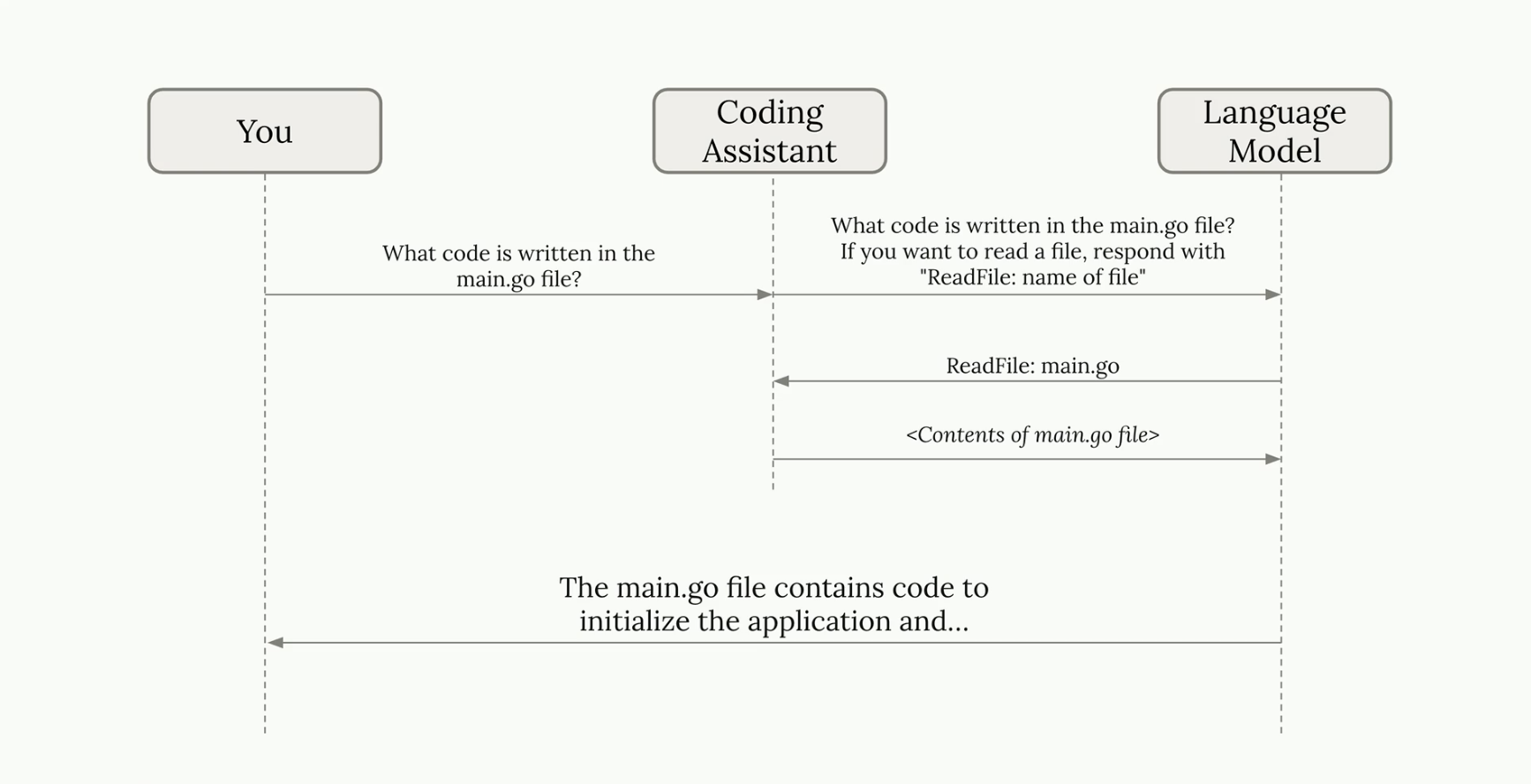
Not just file reading — every form of "interacting with the outside world," including writing files, running commands, and searching the web, is implemented through this Tool Use pattern.
Why Claude Is Different — Tool Use Proficiency#
All language models support Tool Use, but how well they use it varies dramatically from model to model.
The Claude series (Opus, Sonnet, Haiku) shows particular strength in Tool Use. Specifically:
- It accurately judges which tool to use and when.
- It intelligently combines multiple tools to handle complex tasks.
- It interprets the results of tool calls to decide the next step.
This Tool Use proficiency is the core competitive advantage of Claude Code.
Three Key Strengths of Claude Code#
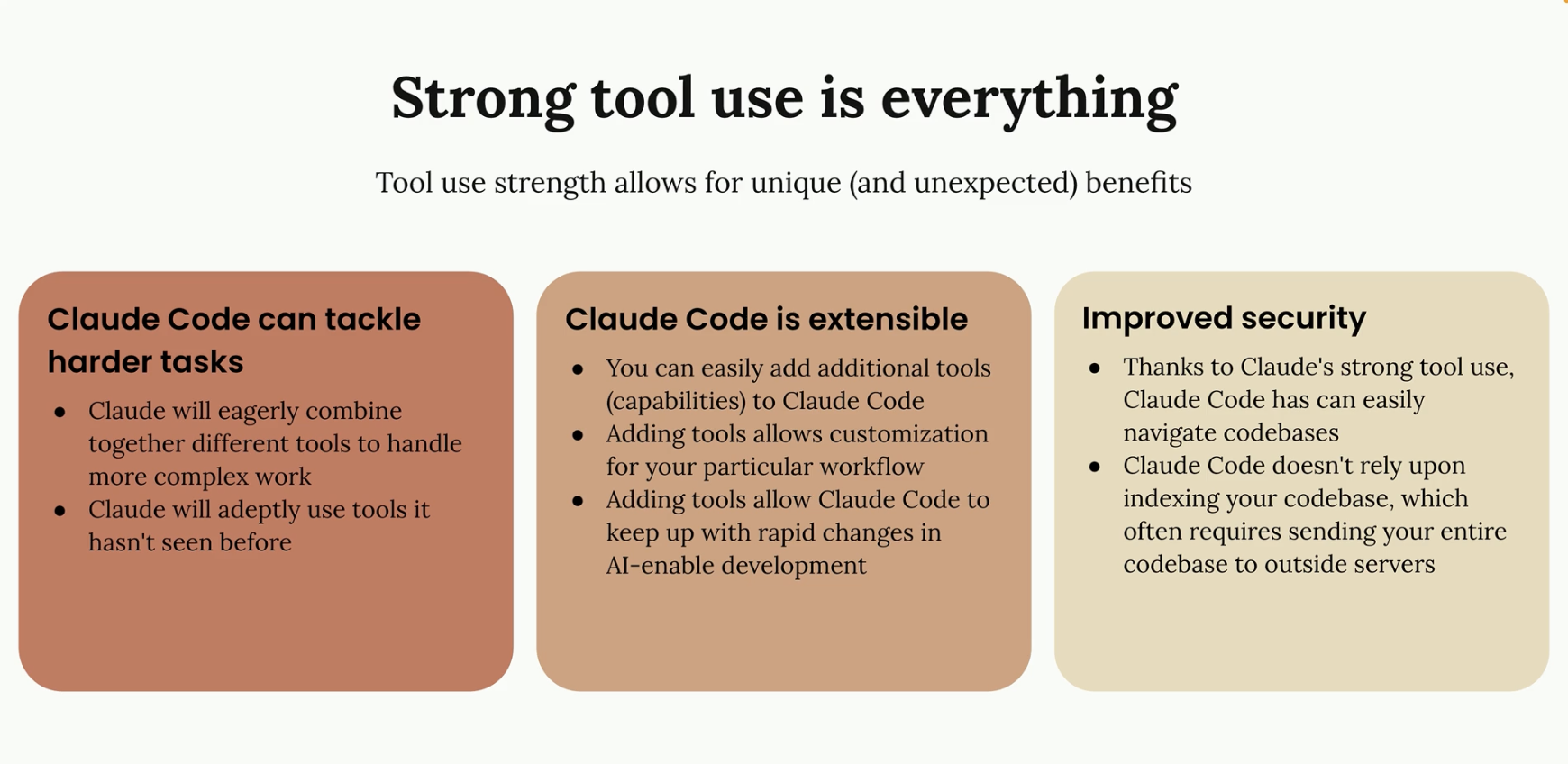
1. Handling Complex Tasks#
When Tool Use is strong, you go far beyond simple autocomplete. Claude can autonomously handle end-to-end workflows: tracking down a bug → identifying the root cause → applying a fix → running the tests.
2. Extensibility#
Claude Code is designed to make adding new tools easy. For example, connecting a Playwright MCP server lets Claude open a real browser, take screenshots, and inspect UI directly. The architecture is built to grow alongside the evolving development ecosystem.
3. Security#
Instead of indexing your entire codebase by uploading it to an external server, Claude searches and reads only the files it needs, on demand. This reduces the risk of sensitive code being unnecessarily exposed to the outside.
Real-World Examples#
Case 1 — Performance Optimization for the Chalk Library#
Chalk is a JavaScript package for colorizing terminal text. Simple as it sounds, it's the 5th most downloaded package in the JavaScript ecosystem with 429 million weekly downloads.
When Claude Code was instructed inside an IDE to "run the benchmarks, find the slowest cases, profile them, and improve performance," it:
- Created a to-do list (for task tracking)
- Ran the benchmark commands
- Wrote files to isolate the slow cases
- Ran a CPU profiler and analyzed the results
- Implemented the code improvements
Result: 3.9x throughput improvement on specific operations
Actual prompt used in the demo: Run the benchmarks. Identify worst performing cases. Use some profiling tools to find the root cause and fix it.
Case 2 — Data Analysis in a Jupyter Notebook#
A streaming platform's user data CSV was provided, with a request to analyze churn causes in a Jupyter notebook.
Claude didn't just write code — it ran each cell, observed the outputs, and used those results to plan and decide the direction of the next analysis. It operated just like a data analyst actually working through the notebook themselves.
Case 3 — GitHub Actions Security Review#
In a project managing AWS infrastructure with Terraform, a developer opened a PR that added a single line of code to a Lambda function — storing user emails in an S3 bucket.
The problem: that S3 bucket was shared with an external marketing partner, and emails are personally identifiable information (PII).
Claude Code ran an automated PR review, examined the Terraform files to understand the infrastructure layout, traced the data flow, and precisely identified that "this change exposes PII to the partner."
A security incident that could have been catastrophic if caught after deployment was stopped at the development stage.
Summary#
| Concept | Key Point |
|---|---|
| Tool Use | The mechanism by which language models interact with the outside world |
| Claude's Strength | Tool Use proficiency — accurate judgment of which tool to use and when |
| Claude Code | A balance of complex task handling + extensibility + security |
It's time to stop thinking of coding assistants as glorified autocomplete. Claude Code is closer to a teammate — one that grasps context, forms a plan, and uses tools in combination to get work done autonomously.
The next post will cover how to apply Claude Code to a real project and strategies for configuring CLAUDE.md.
// Related Posts
Claude Code Hands-on #4 — Hooks in Practice and the Claude Code SDK
A practical guide covering Hook security settings, automated TypeScript type-checking, and a duplicate-query prevention Hook — plus a full reference of all Hook types and how to use the Claude Code SDK for programmatic automation.
Claude Code Hands-on #3 — Controlling Tool Execution with Hooks
Claude Code's Hooks let you inject custom commands before or after any tool execution. From auto-running code formatters to blocking access to sensitive files — here's a practical walkthrough with real examples.
Claude Code Hands-on #2 — MCP Servers and GitHub Integration
A walkthrough of adding MCP servers to Claude Code for direct browser control, and integrating with GitHub Actions to automate PR reviews and issue handling.